Hey guys, its me...
So, for my vlog, I decided to do a "behind the scenes" video to document the programs and software I use to write my code, in case any of you are also interested in programming. Along with that, I included a demonstration of adding a new weapon in my game to show how my coding process works. It goes a little over 4 minutes, so apologies for that... (hopefully it's worth it though)
If you want to skip around, here's a little timecode of the video (they aren't links, sorry!)
0:00 - Behind the Scenes Software Explanation
2:55 - Coding Example
Enjoy!
Thursday, March 23, 2017

Interview - A Progress Analysis
I took the expert interview assignment as an opportunity to look back and reflect on my learning process over the past couple weeks, as we are already well into the project.
For the interview, I asked the following six questions:
I received three responses in total. I have their responses below linked. I will just be referencing excerpts in my analysis below, so I would highly recommend reading through their responses.
Eric Grimson - Professor of Computer Science and Engineering at the Massachusetts Institute of Technology and former Chancellor for MIT. He also taught an Introduction to Computer Science course on edX.org that I took (highly recommended).
David Kosbie - Associate Teaching Professor at Carnegie Mellon University
James Bloxham and Gina Yuan - MIT undergraduate/graduate students and MIT Battlecode competition developer (again, a highly recommended competition. Lots of fun)
With that, here are some of my takeaways and reflections about my programming adventure so far.
I had actually spent a great deal of time during my first week of this project focusing on learning these good practices. Documentation refers to the act of commenting in your code to make it easy to understand (using human language to describe what you are doing in code). Abstraction boundaries is what I talked about in an earlier blog post about using abstract classes to create an outline for your code. Modular design refers to separating your code into different classes, or chunks, and making them totally independent so you don't have to worry about implementation.
Professor Grimson's response reinforced that I have been focusing on the right things when building my game. When I started out coding, I did not know about these coding standards. Yet, I looked at other people's code and noticed how they were all set up in separate classes and packages to make their code modular. I decided to imitate this, even though it wasted a lot of time trying to figure out how classes interact. Yet, it seems that these are extremely important skills to learn for future programming projects, so I'm glad I "wasted" the time learning how to encapsulate code
Those are my biggest takeaways from the interview. I still think it is great to read through the full transcripts, as there was a lot I couldn't touch on in this blog. Sorry for the big text block and lack of illustrations in this post! Until next time.
For the interview, I asked the following six questions:
- What initially drew you into the field of computer programming?
- How did you get started learning computer programming?
- What are the most important traits and skills for a programmer to have?
- What, in your opinion, is the best way to learn computer programming?
- What software or programs do you use to writing code? What is your typical development process when you have to write a new program?
- Would you recommend computer science as a profession for future college students? What do you think high schools can do to prepare future computer programmers?
I received three responses in total. I have their responses below linked. I will just be referencing excerpts in my analysis below, so I would highly recommend reading through their responses.
Eric Grimson - Professor of Computer Science and Engineering at the Massachusetts Institute of Technology and former Chancellor for MIT. He also taught an Introduction to Computer Science course on edX.org that I took (highly recommended).
David Kosbie - Associate Teaching Professor at Carnegie Mellon University
James Bloxham and Gina Yuan - MIT undergraduate/graduate students and MIT Battlecode competition developer (again, a highly recommended competition. Lots of fun)
With that, here are some of my takeaways and reflections about my programming adventure so far.
Encapsulation and Abstraction
"to be disciplined in following good practices of coding (documentation, respecting abstraction boundaries, modular design)." - Eric Grimson
I had actually spent a great deal of time during my first week of this project focusing on learning these good practices. Documentation refers to the act of commenting in your code to make it easy to understand (using human language to describe what you are doing in code). Abstraction boundaries is what I talked about in an earlier blog post about using abstract classes to create an outline for your code. Modular design refers to separating your code into different classes, or chunks, and making them totally independent so you don't have to worry about implementation.
Professor Grimson's response reinforced that I have been focusing on the right things when building my game. When I started out coding, I did not know about these coding standards. Yet, I looked at other people's code and noticed how they were all set up in separate classes and packages to make their code modular. I decided to imitate this, even though it wasted a lot of time trying to figure out how classes interact. Yet, it seems that these are extremely important skills to learn for future programming projects, so I'm glad I "wasted" the time learning how to encapsulate code
Intrinsic Motivation
One thing that everyone who responded to me agreed on is the importance of self-motivation and hands-on practice."It is important, even in a formal classroom setting, to have lots of hands-on practice in creating, debugging and maintaining code. Being required to write and execute code ensures that you have a detailed understanding of the principles underlying code generation." - Eric Grimson
"I’d say creativity and passion. It seems like the best programmers out there got there by always having a pet project to devote their time to. If you can think up an interesting project that you want to see reach the light of day, it shouldn’t be too difficult to find the determination to make it happen, regardless of however many times you need to embark upon a Google quest to work out why your code still isn’t working." - James Bloxham
This really justifies the thought process behind the Genius Project. If we find a project that we're interested in, we are more willing to devote time to learning. The responses also justify my thought process behind choosing gaming as my window into programming. Rather than just read code out of a textbook, it is much better to find a project to work on and learn new skills during the process of trying to implement the game.
Importance of Analytical Thinking over Coding Expertise
One of my interview questions was "What are the most important traits and skills for a programmer to have?" The unanimous answer was problem solving.
"A love of problem solving, that would be first and foremost. Programming is all about solving problems, large and small. Creativity is essential as well. We don't just need solutions, but creative, clever, strikingly original solutions. Teamwork is also essential. Modern programming is nearly always done in teams, and the best programmers not only work well with others, but work best with others, and make everyone around them better as well." - David Kosbie
"To think analytically and logically; to use abstraction and modularity to suppress details and focus on big picture design principles" - Eric Grimson
This is actually my favorite part of programming. More than the physical writing of code, I enjoy the process of getting a problem and trying to figure out a mathematical solution. In writing my game so far, the parts I most enjoyed where the parts where I had to create my own algorithms. I think this is something that many people don't realize about programming. When people push for programming education, I think they skip over the importance of teaching the computational thinking. Computer science is more than writing physical code. It is a way of thinking.
Coding Software
Interestingly enough, every person that I interviewed used different software to write code.
"I strongly prefer lightweight tools. So I do not use Eclipse, or NetBeans, or any such heavyweight IDE's. Sure, they are super-powerful, but also very complex, and they do magic that separates you from the underlying processes, making them harder to understand. So I prefer a lightweight editor like Sublime. For CS1 students, I prefer lightweight integrated environments, like IDLE or pyzo for Python, or DrJava for Java. I also discourage CS1 students from using tools like github, though of course that is required after CS1." - David Kosbie
"To write the code, I use IntelliJ for Java and Sublime Text for most other things (like Python and JavaScript). When I first started coding, I didn’t use the Terminal very much (cmd on Windows), but once you learn how to navigate it coding gets a lot faster. Everyone has something different that works for them!" - Gina Yuan
"There’s so many different programs out there that you can use for writing programs, and every programmer uses a different subset of them. Generally, I just use Emacs, which is a relatively low-level text editor, for writing code, and I run it from the command line. This is pretty versatile, but I wouldn’t recommend this for beginners, as there are many IDEs (like IntelliJ and Eclipse) that can help you find errors in your code quickly." - James Bloxham
It appears that there is not one specific software that people use. Software choice seems more up to preference than one being better than the other. I used Eclipse to write my code (more on this to come in my vlog!), but I will definitely look into trying the other software!
It seems, however, that the design phase that comes before programming is equally important, if not more.
"When I have to write a new program, I definitely plan out the design on paper first. I think the design is usually the more difficult but fun part for me. Implementation comes more easily after that." - Gina Yuan
I guess the tedious and time-consuming process that I undertook drawing out my program structure in Blog 2 was good! At the time, I felt annoyed that I had to do that step, as I just wanted to jump into the code. Looking back, however, the early planning really made my programming a lot easier, as the modular design made changing implementations much easier!
High School
After reading all of the interview responses, I can't help but be thankful for the programming classes that Wissahickon offers for its students. Here are what my experts said about high school programming education.
"As for what high schools can do, there are many options, in some sense too many, since they are not well organized, and there is definitely no standard as yet. So the first thing is simply for high schools to become more informed of their options ... Schools can also work with their local colleges, many of whom have a rich and growing variety of resources for them, such as summer programs, dual enrollment / college-in-high-school courses, teacher training workshops, and outreach programs of all kinds." - David Kosbie
I think our school does a great job of meeting these beliefs expressed by Professor Kosbie. Despite the lack of national standards, we have an extensive curriculum that covers multiple programming languages, goes beyond code and touches on graphics, and fulfills CollegeBoard's AP standards. In addition, we also have dual enrollment programs just like Professor Kosbie suggested. Thanks Wiss!
"It’s also important to get people to try programming regardless of their experience level (everyone starts from somewhere). After that, there’s so many online resources for high school students to learn from. Also encourage students to do outside programming activities like hackathons and CTFs (there are many high school versions or events that allow high school students out there *cough* Battlecode). Since they’re actually building/doing something with code, programming feels so much more useful." - Gina Yuan
Our computer club also does push us to do competitions and personal projects like the experts suggest. I would never have done Battlecode if it weren't for people at computer club. So, I must say, Wissahickon does a pretty good job of teaching computer programming.
Those are my biggest takeaways from the interview. I still think it is great to read through the full transcripts, as there was a lot I couldn't touch on in this blog. Sorry for the big text block and lack of illustrations in this post! Until next time.
Wednesday, March 15, 2017
Blog 4 - Lecture Time!
Yep, I know. Game first. Press [WSAD] to move, [Left Click] shoots bullets, and pressing [X] spawns a zombie where your cursor is. Number keys switch between weapons. So far, [1] is the Revolver, [2] is the Shotgun. Browser mode is a bit fiddly, so you may need to click around a bit before the player registers movement. (This one seems to work on Chrome, but not on Edge... try a different browser if it doesn't work)
As always, click here to download the desktop version if you want the full experience. My code can be found at my GitHub (star, fork, subscribe, whatever people call it these days)
Alright, now for the progress report. Not as much was added this week as compared to the previous weeks. Basically, I added a framework for easily creating multiple different gun types. So far, I only had the time to make a six-shot revolver and a simple shotgun.
(NOTE: HELP WANTED IN MAKING NEW GUNS! JUST FILL OUT THIS FORM AND I'LL MAKE IT HAPPEN!)
name = "______";
description = "________";
damage = ___;
fireRate = ___; //in seconds
reloadTime = ___; //in seconds
bulletsPerFire = ___;
bulletSpeed = ___; //in pixels per second
bulletSpread = ___; //in degrees
maxAmmo = ___;
So, since the actual progress this week is pretty short, I thought I would take the time to do a little "Programming Lecture Time with Yours Truly" about the important programming tricks I have learned so far (emphasis on topics I used this week)
 For example, one could have a Dog class. This class would specify fields such as "Hair Color" or "Species." An Dog object could be Buddy, a specific instance of the class with personal data such as Hair Color = brown and Species = Poodle. This was used in my game because I can have a Bullet class, and every instance of that bullet is its own object.
Now, my dilemma this week was how to make my Weapons for the game. Every Gun has shared methods like getDamage() and getName(), but they also have individual methods like fire() that vary among each Gun. In Java, there are two ways of making generalized classes: Abstract Classes and Interfaces.
I was confused about the two for a long time, but I sort of worked it out in my head with the help of Stack Exchange (think answers.com, but with a good community and actually useful answers).

An abstract class is a template parent class for other "children" classes. It can define some functions that will be passed down to all other children classes, but can leave some to be open for implementation by the children. In an analogy, an abstract class is like being trained as a pilot. All pilots have certain shared characteristics. However, a specific class would be like a F-16 fighter pilot. It contains all the traits of the parent "Pilot" abstract class, yet has individual traits that evolved from the base "pilot traits"
An interface is a broader template. An interface specifies certain methods that a class must have, yet doesn't specify how they accomplish those methods. It is for very general things that can be applied to a large range of classes. For example, "AbilityToEat". A pilot has the AbilityToEat, but so does an infantry soldier, or a spy, or a civilian.
Generally speaking, the order from most abstract to most concrete is as follows:

As always, click here to download the desktop version if you want the full experience. My code can be found at my GitHub (star, fork, subscribe, whatever people call it these days)
Alright, now for the progress report. Not as much was added this week as compared to the previous weeks. Basically, I added a framework for easily creating multiple different gun types. So far, I only had the time to make a six-shot revolver and a simple shotgun.
(NOTE: HELP WANTED IN MAKING NEW GUNS! JUST FILL OUT THIS FORM AND I'LL MAKE IT HAPPEN!)
name = "______";
description = "________";
damage = ___;
fireRate = ___; //in seconds
reloadTime = ___; //in seconds
bulletsPerFire = ___;
bulletSpeed = ___; //in pixels per second
bulletSpread = ___; //in degrees
maxAmmo = ___;
So, since the actual progress this week is pretty short, I thought I would take the time to do a little "Programming Lecture Time with Yours Truly" about the important programming tricks I have learned so far (emphasis on topics I used this week)
Abstract Classes vs. Interfaces
A major paradigm in programming is Object Oriented Programming. In this paradigm, everything is a class or object. A class is a general category that contains various variables (known as fields) and functions (known as methods). An object is a specific instance of a class.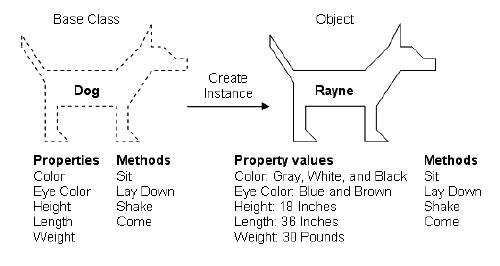
Now, my dilemma this week was how to make my Weapons for the game. Every Gun has shared methods like getDamage() and getName(), but they also have individual methods like fire() that vary among each Gun. In Java, there are two ways of making generalized classes: Abstract Classes and Interfaces.
I was confused about the two for a long time, but I sort of worked it out in my head with the help of Stack Exchange (think answers.com, but with a good community and actually useful answers).

An abstract class is a template parent class for other "children" classes. It can define some functions that will be passed down to all other children classes, but can leave some to be open for implementation by the children. In an analogy, an abstract class is like being trained as a pilot. All pilots have certain shared characteristics. However, a specific class would be like a F-16 fighter pilot. It contains all the traits of the parent "Pilot" abstract class, yet has individual traits that evolved from the base "pilot traits"
An interface is a broader template. An interface specifies certain methods that a class must have, yet doesn't specify how they accomplish those methods. It is for very general things that can be applied to a large range of classes. For example, "AbilityToEat". A pilot has the AbilityToEat, but so does an infantry soldier, or a spy, or a civilian.
Generally speaking, the order from most abstract to most concrete is as follows:
Interface >> Abstract Class >> Class >> Object
Arrays vs. ArrayLists
These are two common topics that come up in programming.
- An array is a structure that stores a FIXED amount of data. Once you create an array, you cannot change its length.
- An ArrayList is a structure that stores a VARIABLE amount of data. You can append things to the end, change things in the middle, remove things as you go. It's basically your jack of all trades. The only downside is that it is slow (slow in computer terms being "oh no, it's 10 nanoseconds longer!!! We're going to die!!)
When making my weapons, I used both arrays and ArrayLists. ArrayLists were really useful when storing bullets. I could add as many bullets as I wanted to the list, whenever I wanted to, and I could remove them at will. When storing user weapons, however, I wanted to use arrays. After all, it wouldn't be right if your character could hold infinite guns...
I thought it would be better to limit players to 10 weapons (yep, totally realistic...)
 Gradle

Everyone's favorite elephant!!!
No, but seriously, Gradle rocks.
In case you missed my first blog post, Gradle is known as a "dependency management system." Basically, it downloads all the libraries you need for you and structures your project automatically
When I was trying to make this blog post, an hour of my life got wasted trying to export the game to work on a browser. I kept getting an error that the font wouldn't work on the HTML application, even though it worked on the desktop version. After intense Googling, I found out that this was a bug in the libGDX library I was using. Luckily, it was fixed in the new version that was published. Normally, updating the library would require manually downloading tens of files and replacing folders meticulously. With Gradle, however, I just needed to change ONE LINE OF PROPERTIES and the program automatically downloaded all the dependencies I needed! Woooooooo!
 |
| All I had to do was change 1.9.5 to 1.9.6!!! |
Thank you Gradle!!
Well, that's all I have for today. Please, give me weapon suggestions and anything you want to see in the game. Also, I was thinking of vlog ideas, and I had an idea to do a "My Setup" type video to show all the programs and tools I use to do programming. What do you guys think?
Sunday, March 5, 2017
Blog 3 - Pew Pew
Alright, as always, the game comes before the speech. Press [WSAD] to move, [Left Click] shoots bullets, and pressing [X] spawns a zombie where your cursor is. Browser mode is a bit fiddly, so you may need to click around a bit before the player registers movement.
As always, click here to download the desktop version if you want the full experience. My code can be found at my GitHub (star, fork, subscribe, whatever people call it these days)
If you couldn't tell, the main focus of this week was bullets. I coded in bullets to appear whenever the user clicks a mouse (with a little spread, to make weapons realistic). There were 3 main features bullets had to have: they had to move in a straight line, they had to deal damage to zombies, and they had to disappear when they collided with something. Surprisingly, programming this was a lot easier this week than last week was. This is mainly because I could apply all the basics that I learned last week programming zombies.

As always, click here to download the desktop version if you want the full experience. My code can be found at my GitHub (star, fork, subscribe, whatever people call it these days)
If you couldn't tell, the main focus of this week was bullets. I coded in bullets to appear whenever the user clicks a mouse (with a little spread, to make weapons realistic). There were 3 main features bullets had to have: they had to move in a straight line, they had to deal damage to zombies, and they had to disappear when they collided with something. Surprisingly, programming this was a lot easier this week than last week was. This is mainly because I could apply all the basics that I learned last week programming zombies.
Applying Knowledge! Who knew learning comes in handy!?
Bullet Paths
So last week I talked about how I used vectors to make the zombies follow the player. Well, turns out that is the same method for making bullets move towards the cursor! Zombies had a position, and a destination to walk towards. I could use the same code, but replace the zombie's position with the bullet's position, and the destination with coordinates for where the mouse pressed!

The code to do this is flightPath = new Vector2().set(clickLocation).sub(startPosition).nor();
This makes the cursor vector and subtracts the start position (bullets stem from the player). the command nor() normalizes the vector, which means it sets its length to 1. This allows me to scale the speed of the bullet.
New Stuff!
Drawing Bullets
Drawing the bullets on the screen was mostly the same as drawing zombies, but slightly different. I needed to rotate the bullets in the direction they were being shot, or else it would look like a horizontal line moving on a diagonal. This presented one of the issues that became a recurring theme when working with external libraries like libGDX. I wanted a command that would do: draw(image, xCoordinate, yCoordinate, rotation). Instead, the only draw command in libGDX with rotation as a parameter is
draw(Texture texture, float x, float y, float originX, float originY, float width, float height, float scaleX, float scaleY, float rotation, int srcX, int srcY, int srcWidth, int srcHeight, boolean flipX, boolean flipY).
Ew.
But I had to use it because that was all I've got to work with *sad face*
Hitboxes
Now, the next issue was hitboxes. I had used libGDX's circle class for zombie hitboxes, but that wouldn't work for bullets. Instead, I had to use libGDX's polygon class. That wasn't too bad. I just inputted coordinates for a rectangular polygon and applied the same rotation as I did to the bullet drawing. Collisions, however, were more annoying. You see, libGDX has an Intersector class that deals with polygon collisions. Hurray, I thought. It would take care of everything for me.
Well... nope. You see, I needed a collision for Polygon on Circle. The Intersector class had
test(Polygon, Polygon)
test(Circle, Circle)
test(Circle, Rectangle)
test(Circle, line)
test(Polygon, line)
...
LITERALLY EVERYTHING EXCEPT test(Polygon, Circle)!!!
So, I was forced to search the internet for a custom intersection function. I ended up writing a function that would test every line of my polygon against a circle for intersections. That was fun...
Next week on... Programming for Gamers...
So, next week, I plan on spicing the game up a bit. Now that I have a framework for shooting bullets, I plan on making a variety of guns that do different amounts of damage. If I have time, I also want to make different zombie types so there is variation in the enemies you fight. Finally, and this will probably be in a couple of weeks, but I want to make the game look better than just blue and green circles. I was lucky enough to have someone at computer club (shoutout to CS club, it is a lot of fun and you should join) make some pixel art for me, so hopefully I can add that to the game soon.
Well, that's all for this week folks. See ya later!
Subscribe to:
Posts (Atom)